

Wednesday, January 28, 2026
Home Blog Page 4531

Wichita State professors invent accessory lens for Google Glass

0

Wichita State University professors Jibo He and Barbara Chaparro continue to find ways to be creative and innovative — this time inventing a device that could have positive ramifications in the medical field and beyond.

Their latest invention, developed with the help of WSU grad student Long Wang, is called Google Lens.

The device is an accessory lens that attaches to Google Glass, which is a wearable product that uses voice control so users can check information easily while keeping their hands busy. Information can be displayed in Google Glass’ see-through head-mounted display, and its built-in camera allows convenient video sharing and remote conference.

But the view users have with Google Glass has one drawback, He says. Its webcam has a narrow visual field of 54.8 degrees horizontally and 42.5 degrees vertically. The narrow field of view limits Google Glass’ usefulness for some applications.

Enter Google Lens, which expands the device’s view by 58 percent horizontally (to 109.8 degrees) and 34 percent vertically (to 57.8 degrees).

Why is it important to expand Google Glass’ view?

Professionals are starting to use Google Glass, for everything from surgery and medical training to usability research and even flying a plane. Several hospitals, including Wesley Medical Center in Wichita and the renowned Brigham & Women’s Hospital in Boston, are building Google Glass applications to improve their medical services, surgery and new doctor training.

“The object they want to broadcast may be out of the field of view of Google Glass,” He says. “Despite all of its remarkable features, Google Glass has some limitations in its hardware.”

Google Lens, he says, solves that problem.

It includes a holder to attach the lens to the frame of Google Glass. The lens that is fitted into the accessory can be changed easily.

“The accessory lens helps remedy the bottleneck of Google Glass’ camera and improves and expand Google Glass’ application in professional areas,” He says.

He and Chaparro have applied for a U.S. patent for Google Lens and are awaiting approval.
The Windows Server 2003 Era Is Ending: What It Means For Small & Midsize Businesses And How To Plan For Migration

0

(NAPS)—A lot has changed in the past decade since Microsoft launched Windows Server 2003. Capabilities that were previously only available to a large enterprise are now affordable and accessible to businesses of any size—hardware is less expensive, devices are smaller, virtualized operating systems are more efficient, and robust collaboration solutions like Office 365 are available at a fraction of the cost compared to maintaining them on premises. In addition, the way we work has changed—we’re more mobile and more social in the workplace than ever before. However, despite all these advances, many companies large and small are still running on outdated technology.

There’s never been a more important time for companies to upgrade their technology to help them grow more efficiently and more cost effectively. That’s because support for Windows Server 2003 will end on July 14, 2015. For businesses that do not upgrade to more modern technology, it can result in a less secure and stable infrastructure.

Once support for Windows Server 2003 is over, there will be:

  • No updates—Microsoft will no longer develop or release any updates after ending support, which can increase security risk, result in slower performance and cause potential downtime of business applications.
  • No savings—The costs of maintaining your legacy servers can add up quickly—while cloud infrastructures can deliver significant benefits to your small business’ bottom line.
  • No compliance—After support ends, your business will likely fail to meet most industrywide compliance standards and regulations, which increases the risk for your daily business transactions.

Change Brings Opportunity

The good news is that migrating from Windows Server 2003 could signal the beginning of a new stage for your business, providing it with additional capabilities that are now more affordable and accessible for companies of any size. For example, by upgrading to the latest on-premises operating systems and cloud platforms, like Windows Server 2012 (R2) and Microsoft Azure, companies can have the flexibility to scale their businesses up and down based on their needs without a large up-front capital cost, and they have access to enterprise-grade security, disaster recovery and much more.

When upgrading, all business owners need to consider their options and decide on what makes the most sense for their company. Microsoft offers the following tips to help you find out which solution might work best for your company.

  1. Discover

The first step is to discover what applications and software you have running on outdated technology like Windows Server 2003.

There are several self-service tools that can help with this process, such as the Microsoft Assessment and Planning (MAP) Toolkit, to help you assess your current IT infrastructure and determine what platform might be best for you as a next step. You can also contact a Microsoft partner to help you make this decision.

  1. Assess

Once you’ve identified what applications and software need to be moved off your outdated technology, create a transition plan that will create as little disruption as possible for your employees. If customized applications are blocking your migration, connect with your Microsoft IT partner to formulate a plan.

  1. Target

Choose where you’d like to move your current workloads and applications. For example, you can choose to keep your applications on premises with a new server like Windows Server 2012 (R2), move to the cloud on a platform like Microsoft Azure, or do a combination (or hybrid approach) of both.

  1. Migrate

Several vendors offer do-it-yourself tools to assist in the decision-making process and in the migration itself, including Dell ChangeBASE, Citrix AppDNA, AppZero, Refresh IT, BlueStripe and Microsoft Services JumpStart for Windows Server 2003. Make sure to ask your Microsoft partner or team for any additional migration deals in place.

Remember, if you have any questions along the way, there are local experts—Microsoft partners—that can assist you with this transition during any step or simply help you determine what the right choice is for your business.

Cloud On Your Terms

If you are still trying to determine which type of cloud is best for the specific needs of your business, whether it’s virtualization on premises or in a public cloud with Microsoft Azure or with a hosting partner, here are a few questions and answers that may help:

  • Are flexibility and scalability extremely important to your business? Do you lack the dedicated IT resources to deploy and manage your own hardware? Consider a public cloud solution such as Microsoft Azure or one of Microsoft’s hosting partners.
  • Does your business store a large amount of sensitive data or work in a highly regulated industry? Perhaps a virtualized on-premises solution built with the support of a partner.
  • Do your technology needs span all these scenarios, requiring the unique benefits of a hybrid cloud solution? You may want to consider leveraging Windows Server 2012 (R2) on premises augmented with the benefits of Microsoft Azure or Office 365.

To learn more, visit www.microsoft.com/en-us/server-cloud/products/windows-server-2003, or to find a Microsoft partner, visit https://pinpoint.microsoft.com.


The end of one technological era often presents a company with a chance to embrace new technology and become more competitive.


A Lush Lawn in 4 Easy Steps

0
Source: John Deere

lawn care2(Family Features) Want to get the best out of your lawn this year? Implement these simple hacks to keep your lawn green and growing, your equipment up and running, and your yard looking great:


  1. Feed your lawn. In order to maintain a healthy lawn, you should fertilize twice a year. Start the process one month after the lawn starts growing in the spring, and one month before the lawn goes dormant in the fall. Spring fertilization is imperative, as it replenishes nutrient reserves that have been used up during the first growth spurt of the season. Avoid “burning” the lawn by only fertilizing at the recommended rate and ratio for your lawn. Check with the experts at your local lawn care supply store to choose the correct dose.


  1. Perform mower checkups. A properly running mower is essential to keeping your lawn looking great. Make sure it’s ready for every mow by incorporating these maintenance tips into your routine:


  • Change your mower oil. This should be done every 25 hours of use for a walk-behind mower, which is once a year for most users. For a lawn tractor, change the oil every 50 hours.
  • Keep your mower clean. Brush away grass clippings from the cooling fans and keep air intake screens clear so air can pass through. Make sure that all safety shields are in place to protect you and your family.
  • Sharpen your blade. A dull blade will split grass blades, leaving them susceptible to disease. Sharpen the blade to about one sixty-fourth of an inch for a clean cut. Also, be sure the blade is balanced to ensure an even cut.


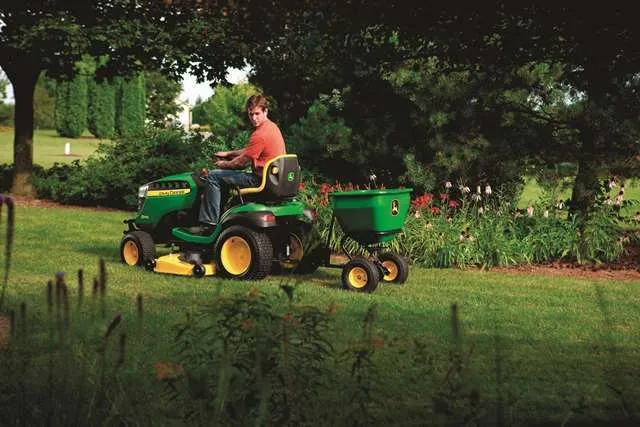
  1. Mulch instead of bag. Mulching while you mow leaves a thin layer of grass clippings on the lawn. These clippings gradually break down to provide additional nitrogen to the lawn. This provides a natural fertilizer throughout the mowing season. Look for mowers with specifically designed mulching mower decks and blades that cut clippings into tiny pieces, returning them to the turf. A riding mower, like the John Deere S240 Sport allows you to choose if you want to mulch, side-discharge or bag clippings without the need for additional tools.


  1. Do more with your mower. You can now do more than ever with your tractor by adding implements to help complete yard tasks more quickly, and enjoy some rest and relaxation on the weekend. Use utility carts for hauling, spreaders for applying fertilizer, aerators to renew the soil, or even a snowblower attachment to remove the snow from your driveway.


From mulching to mowing to feeding, keeping your lawn green and growing requires a little strategic care, but the reward is as sweet as the smell of fresh cut grass. For more ideas and equipment to get your yard in shape, visit www.JohnDeere.com/Residential.

Source: John Deere


Taxation Laws Deter Newcomers From Growing Christmas Trees

0

Customers of “choose and cut” Kansas Christmas Tree Farms are probably going to have a difficult time finding a location to cut their perfect tree in the future.


“In the past few years, Kansas Christmas tree growers have conquered dry weather, insects and poor economic conditions.  Now Christmas tree growers are facing a tax issue that is causing them problems,” according to Eldon Clawson, a Christmas tree grower operating Country Christmas Trees near Wakarusa.


“Making it difficult is a 2012 state tax law change, where a farmer’s expenses are added to their state adjusted gross income.  Especially hard hit are the new startup Christmas tree farms.  So hard, that only one new farm has joined the Kansas Christmas Tree Growers Association (KCTGA) in the past few years,” explained Clawson, immediate past president of  the KCTGA.


“At present, we seem to have less and less new Christmas tree growers since all tree growers income is taxed differently than other small businesses in Kansas,” he pointed out.


Any other crop or livestock enterprise would give “startup farmers” an opportunity for more immediate income, making a quick income flow enterprise  seem more feasible for a new farm startup in Kansas than trees, Clawson related.


“Since 2012, farms in the state have been exempt from Kansas income tax on their net farm income.  However, if you don’t have income for several years, like tree farmers, the new tax law makes it difficult to stay in business since they have expenses, while still paying state tax on those same expenses,” continued Clawson, also a director of the National Christmas Tree Association.


New Christmas tree growers don’t realize an income for seven or more years, because the trees grow at the rate of one-foot or less a year.  It takes Christmas trees years before they are ready to sell to customers.


“So, new growers must experience expenses that become taxed for those seven or more years.  All the while, they are facing environmental conditions threatening their tree crop that add to the expenses,” Clawson said from experience.


Longtime Christmas tree growers in the state face the same tax issue as new growers, but they also face another state tax issue due to the way Christmas trees are taxed at the federal level.


“Christmas tree growers report their income from selling trees as capital gains on their federal tax returns, since Christmas trees come under the Federal Timber Tax Law.  Therefore,  income from Christmas tree sales is included in the federal adjusted gross income, and becomes the basis for state adjusted gross income,” Clawson stated.


Most expenses of a Christmas tree farm are reported on Schedule F of Farm Income, he said. Therefore, since income is reported as capital gains, Schedule F shows a loss approximately equal to the farm’s operating expense.


“Since the tax law change of 2012, this loss is disallowed and added back into the state adjusted gross income.  Consequently, the farm must pay income tax on all of their income claimed as capital gains as well as most of their operating expense in growing trees and  purchasing equipment,” Clawson explained.


“In other words, this results in paying state income tax on the majority of gross sales of trees grown and cut in any one year, and then also in each additional year,” Clawson clarified.


“It will become more and more difficult to find ‘choose and cut’ Christmas tree farms in our state with the present state taxing system for Christmas trees.   Since only one new farm has been started in Kansas in the past several years, customers might then turn to established growers to choose a tree,” Clawson predicted.


“They will find, however, a majority of those longtime growers are facing retirement and getting out of the tree business for that reason.  This will leave no place for those choosing the perfect Christmas tree.  And, just as important, no farm to experience the harvesting of a beautiful Kansas grown Christmas tree,” said Clawson, who can  be contacted at Country Christmas Trees, Wakarusa, 785-207-5135.

He’s on Facebook, and his website is www.cctrees.us.

A Cowboy’s Faith: Positive Intentions Create Irritation

0
Frank J Buchman
Frank Buchman

By Frank J. Buchman


“That just makes a person’s blood boil.”


Our judging team coach criticized us 43 years ago after we mixed up the placing on a Hereford heifer class in the college livestock judging contest at the Houston Livestock Show, when the official card was obvious to him.


Reminder of the comment comes when we can’t understand why somebody does something different than what seems apparent.


Just a year ago, doing our job trying to assist in developing an advertising campaign, we were persistent, to the point that when the phone was finally answered, response: “I’m furious. You  infuriate me,” with a slamming in our ear. Shocked us how anybody could get upset by somebody trying to help.


Recently, after we’d written a story about one of our friends, a mentor of sorts, we sent the article to him before going to press, as we’d changed quotations to “read better.” Most writers never let anybody see their stuff, other than editors, before being printed. We do for accuracy, and to prevent misunderstandings.


This time, e-mail response, again: “I’m furious. Furious.” Then: “Fuming.” Stunned, how could we make someone mad by telling their successful life’s story?


Calling him, we apologized for whatever we’d done wrong, requested changes, so we could meet newspaper deadlines, to which we thought he agreed.


When published, contrasting typical appreciative response, this comeback: “I am incredulous.” Then, 60 times: “Please.” And, “Don’t run it anywhere else. I thought you understood how much I hated it.”


Incomprehensible how trying to do good goes astray. Still, there have been previous occasions; threatened to be slugged in our college dorm, others whacking pica pole on desk, throwing scissors across the floor, permanent door indention from a fist, and colts going into a bucking rage


None of this has been intentionally offensive. We’re TCB, acronym for “taking care of business,” as used by Elvis Presley. Now, it’s TCGB, our interpretation we’re doing what He expects.


Reminds us of First, Proverbs 15:18: “A hot-tempered man stirs up strife, but he who is slow to anger appeases contention.” Yet, Ecclesiastes 10:4:  “If the temper rises up against you, do not leave your place; for gentleness and calmness prevent or stop great offenses.” And, Ephesians 4:31: “Let all bitterness, indignation, wrath, resentment, quarreling, slander and malice be banished from you.”